



In this guide
- Check your du number in the du app
- The du number check code
- See every du number on your Emirates ID (TDRA Hesabati)
- Three ways that work without any code
- Looking for something else?
- What your du number might be worth
- Frequently asked questions
- Sources
A new SIM, a second line for work, an eSIM you set up months ago — there are plenty of reasons to forget your own number. If you are wondering how to check a du number you already hold, du gives you several official ways to see it, and none of them cost anything. This guide shows each one with a screenshot from du's own website or from the regulator, so you know exactly what you are looking for before you start.
Check your du number in the du app
If the du app is on your phone and signed in, this is the fastest answer to "how to check my du number". You do not need to open any menu.
- Open the du app and sign in.
- Look at the very top of the home screen. Under your name you will see your plan type — Postpaid or Prepaid — followed by your du number.
- If you have more than one du line, tap View all accounts under the number to switch between them.
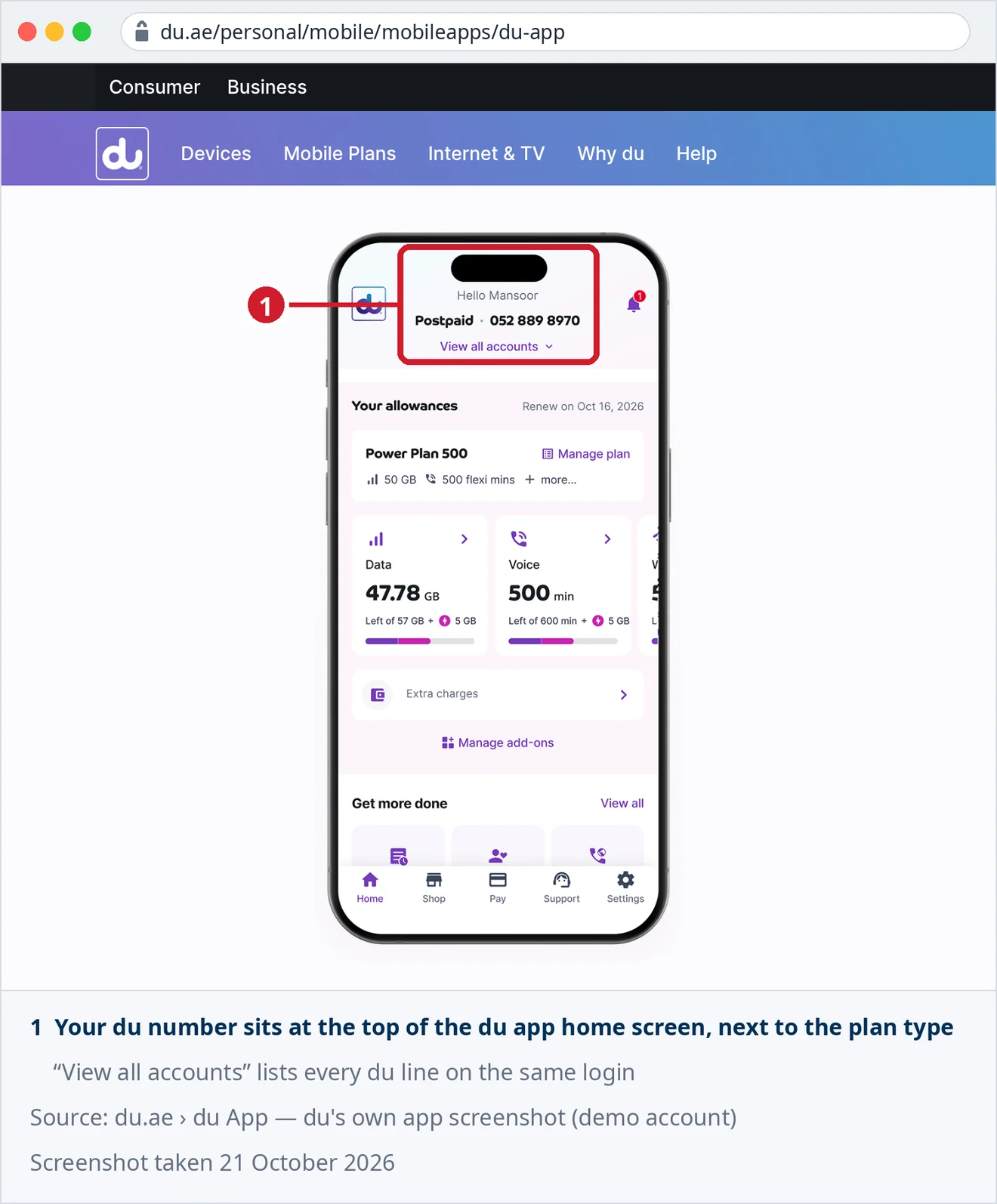
The app needs you to be signed in, which is why it is best for checking a line you already manage — not a SIM you have just put in a phone. For that, use one of the methods further down.
The du number check code
Most guides promise a single du SIM number check code. du's own published list does not have one. Its official table of "important short codes" — shown below — has no entry that simply displays your number. What it does list is *135#, under "Manage your line", which opens du's self-service menu, and 155 for du Customer Care.
- Open the phone app on the du SIM and dial *135#, then press call.
- du's self-service menu opens on screen. du launched the *135# portal in 2016 as a free service; the options you see depend on your plan.
- If you still cannot find your number, call 155 from the same line and ask du Customer Care.
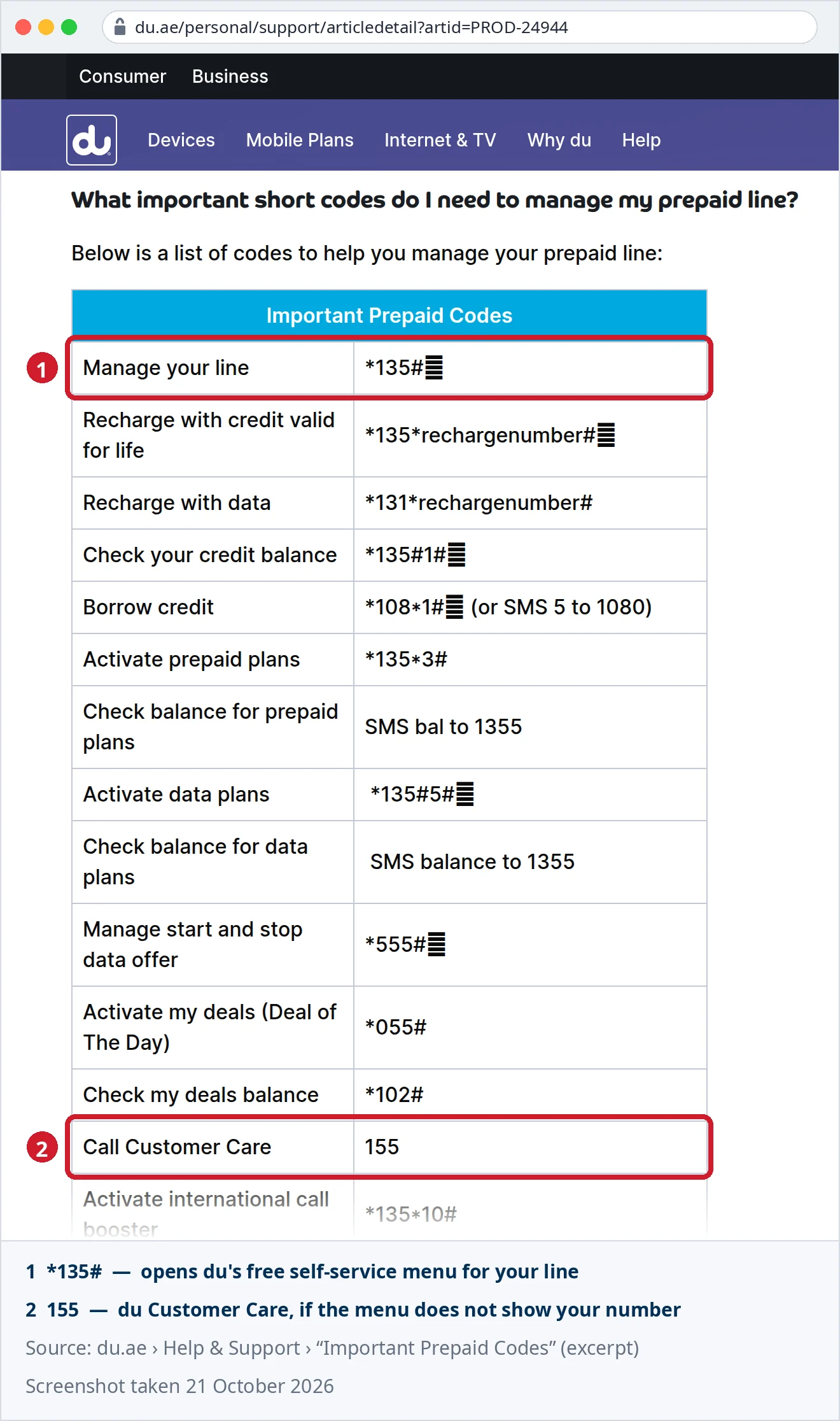
You will find other codes for this on the web. We checked them against du's official list on 21 October 2026 and they are not in it, so we do not repeat them here. If you want a method du itself documents and that shows the number every time, use the du app or TDRA Hesabati.
See every du number on your Emirates ID (TDRA Hesabati)
If you are not sure which du SIM is which — or you want to check whether a line you no longer use is still registered to you — the regulator has a better tool than any code. Hesabati, run by the Telecommunications and Digital Government Regulatory Authority (TDRA), lists every active mobile and fixed number registered under your Emirates ID, across all UAE providers.
- Open the Hesabati service page on the TDRA website, or the TDRA smart app.
- Sign in with UAE PASS.
- Choose Hesabati from the menu. You will see a list of your active numbers.
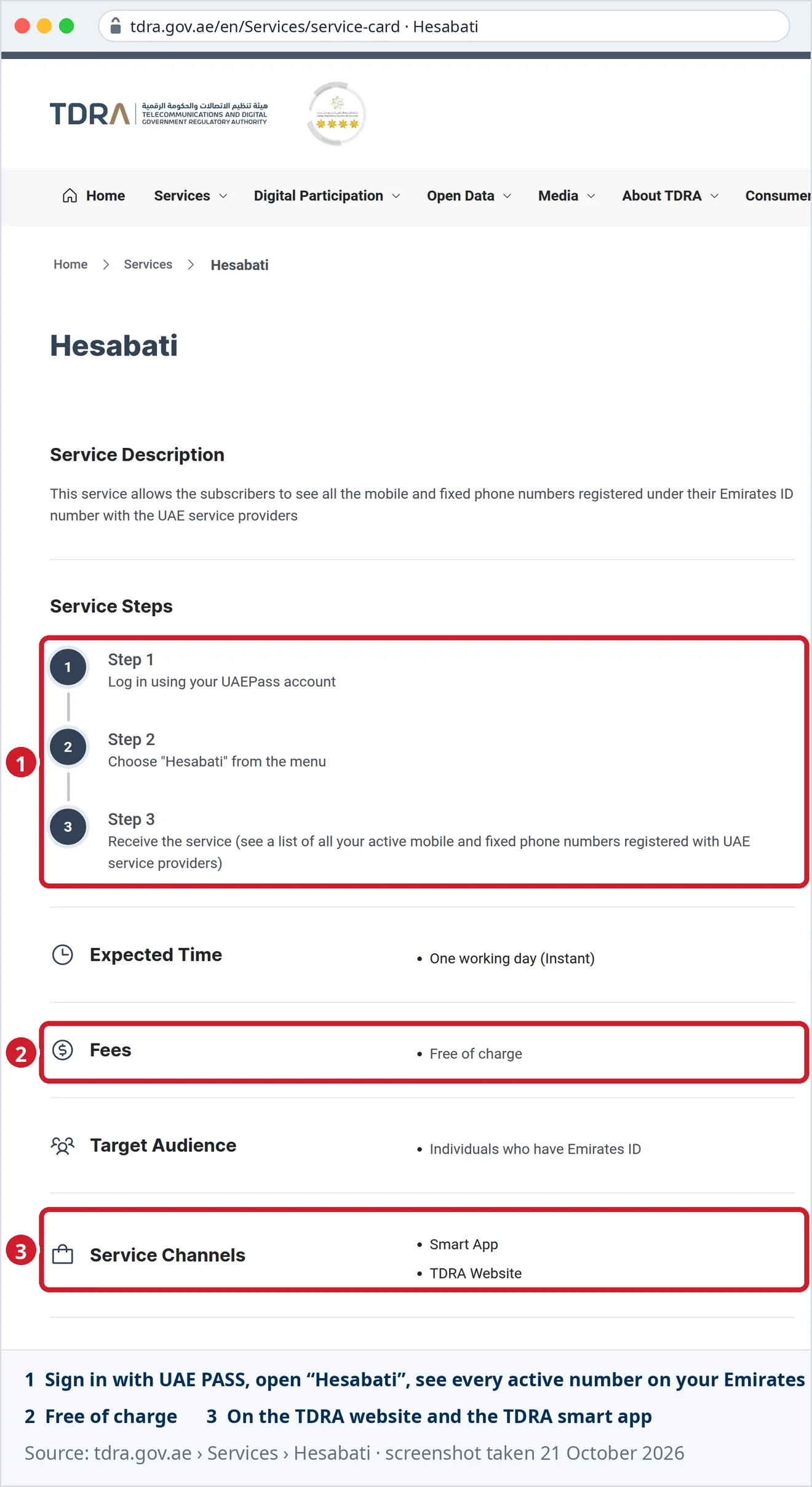
Two details from the service card are worth knowing. The service is free of charge, and only active numbers show on the list — a line that has already been disconnected will not appear.
Three ways that work without any code
Call or message someone you trust. Call a friend or send them a WhatsApp message from the du SIM. Your number shows on their screen, unless you have hidden your caller ID. It is the one method that works on any phone, with any SIM, in any language.
Check your phone's settings — with one caveat. Many phones show the number under their SIM or phone settings. Apple also documents a shortcut: when you type "My number is" followed by a space, iPhone's predictive text suggests your phone number. Both only work if the number is stored on the SIM. If the phone shows "Unknown" or "No number available", that is the SIM, not your line — use one of the methods above instead.
Look at your paperwork. A du postpaid bill names the line it was issued for, so last month's bill in the du app or in your email answers the question as well.
Looking for something else?
This guide is about finding your own du number. A few related questions have their own guides:
- An Etisalat or Virgin Mobile line? Our guide to checking your own mobile number in the UAE covers all three operators.
- Someone else's number? There is no public du tool that shows who a number is registered to. See how to check a mobile number owner and how to identify an unknown caller.
- Which network a prefix belongs to? A prefix only shows where a number was first issued; under number portability the line can move. The UAE prefix lookup explains it.
- How many SIMs you may hold? See how many SIM cards you can have in the UAE.
What your du number might be worth
Once you have your number in front of you, it is worth a second look. Most du numbers are ordinary, but a repeated tail, a mirror or a short sequence can be worth real money. On this marketplace there are 1,229 active du listings today. Private sellers ask a median of AED 20,000 across 184 priced listings, against AED 6,900 for our house account — and 13 private listings ask AED 100,000 or more. These are asking prices, not completed sales.
You can run your digits through the free mobile number value calculator, compare them with the du numbers currently for sale, or list your du number for a one-off AED 29 with no commission on the sale.
Frequently asked questions
What is the du number check code?
du does not publish a dedicated code that only shows your number. Its official short-code list includes *135#, which opens du's self-service menu for your line, and 155 for du Customer Care. The du app and TDRA Hesabati both show the number directly.
How to check du SIM number without balance?
Use the du app or TDRA Hesabati — both need an internet connection, not credit. du introduced the *135# self-service menu as a free service. Calling or messaging a friend from the SIM also works, as long as the call or message can go through.
How can I check my du number in the du app?
Open the du app and sign in. Your number is shown at the top of the home screen, under your name and next to your plan type. If you manage several du lines, tap View all accounts to switch between them.
How to know my du number on a new SIM?
A brand-new SIM is not yet linked to a du app login, so call or message a friend from it — your number shows on their phone. Once you can sign in, the du app home screen shows the number permanently.
Can I see all my du numbers in one place?
Yes. Sign in to TDRA's Hesabati service with UAE PASS on the TDRA website or smart app. It lists every active mobile and fixed number on your Emirates ID across all UAE providers, free of charge.
Is checking my du number free?
Yes. The du app, the *135# self-service menu and TDRA Hesabati are all free to use.
Is my du number worth anything?
Most are ordinary, but patterns such as repeated digits or mirrors can carry a premium. Check the digits in our free value calculator and compare them with the du listings for sale before you decide.
Sources
- du, Help & Support — "What important short codes do I need to manage my prepaid line?" (Important Prepaid Codes, including *135# and 155). Read and screenshotted 21 October 2026.
- du, "du App" product page — official app screenshot of the home screen (demo account). Read and screenshotted 21 October 2026.
- du press release, 1 May 2016 — the *135# self-service portal, free of charge.
- TDRA, Services — Hesabati service card: steps, fees, target audience, service channels and conditions. Read and screenshotted 21 October 2026.
- Apple Support, iPhone User Guide — "Use predictive text on iPhone".
- Codes for this purpose published on third-party websites were compared with du's official short-code list on 21 October 2026 and are not included in it.
- Listing counts and asking-price medians from this marketplace's own live data, 21 October 2026, reported separately for the house account and private sellers.
- Operators change codes, apps and menus without notice. Everything above was checked on the dates shown; confirm your own case with du before relying on it.