



If you've been following the UAE telecom space in 2026, you'll have noticed a quiet but decisive shift: physical SIM cards are on the way out. Etisalat by e&, du, and Virgin Mobile have all moved eSIM to the front of their onboarding flows, UAE Pass biometric verification is now the default path, and a growing number of phones sold in the country ship with no SIM tray at all. For anyone sitting on a premium UAE number — a hard-won 050 triple-seven, a repeating 052, a patterned 055 — the question is no longer whether to move to eSIM, but how to do it without putting your number at risk.
The good news: your VIP number does not change when you switch. The SIM is just the key that unlocks the line; the line itself — your Emirates ID registration, your plan, your monthly history — lives on the carrier's side. The less-good news: each carrier has slightly different rules, fees, and device requirements, and the 2026 biometric activation rules mean a single failed UAE Pass verification can delay your transfer by days. For an expensive number, that friction matters.
This guide walks through every detail you need: how eSIM works in the UAE in 2026, the exact activation process for Etisalat, du, and Virgin Mobile, device compatibility, what to do with a corporate VIP number, and the security angle that makes eSIM especially attractive after the CBUAE's phase-out of SMS OTP. We'll also flag the handful of mistakes we see most often when VIP owners transfer to eSIM — small oversights that can temporarily lock you out of your own number.
Table of Contents
- Why eSIM Matters for VIP Numbers in 2026
- What Is an eSIM — A 60-Second Primer
- Who Offers eSIM for VIP Numbers in the UAE
- Etisalat (e&) eSIM Activation for VIP Numbers
- du eSIM Activation for VIP Numbers
- Virgin Mobile eSIM Activation for VIP Numbers
- Step-by-Step: Transferring Your VIP Number to eSIM
- Device Compatibility — What Works, What Doesn't
- Security: Why eSIM Matters After the SMS OTP Ban
- Common Mistakes VIP Owners Make
- Frequently Asked Questions
- Conclusion
Why eSIM Matters for VIP Numbers in 2026
Three forces have converged in 2026 to make eSIM the default rather than the alternative. First, the TDRA-led push for UAE Pass biometric authentication has removed the need to visit a store for most account changes, which in turn means the physical SIM — historically the "proof" a line belongs to you — has lost its authority. The biometric trail is now the authority; the SIM is just plastic.
Second, devices have caught up. The flagship iPhones sold in the UAE since the iPhone 14 default to eSIM even when a physical tray is present. Recent Samsung Galaxy S and Z series, Google Pixel, and several Honor and Huawei models support it natively. In many cases, the phone you're holding right now can carry your VIP number on eSIM today, with no hardware purchase.
Third — and this is the part VIP owners feel most — eSIM is structurally safer. A physical SIM can be cloned, swapped, or socially engineered at a retail counter. An eSIM tied to UAE Pass biometrics cannot be moved to another device without a facial recognition check on your Emirates ID. For a number worth five or six figures, that's not a feature — it's insurance.
What Is an eSIM — A 60-Second Primer
An eSIM ("embedded SIM") is a small chip soldered into your phone's motherboard that performs the same cryptographic role as the plastic SIM you're used to. Instead of shipping you a physical card to slot in, your carrier sends a profile — a small encrypted package — that your phone downloads and writes onto the embedded chip. Once installed, the eSIM behaves like any other SIM: calls, SMS, data, OTPs, everything.
The practical differences are three. One, there is nothing to post, lose, or snap in half. Two, a single phone can hold multiple eSIM profiles at once — useful if you keep a personal VIP line and a business line on the same device. Three, profiles are tied to your device's unique EID, not to a removable card, which is why moving an eSIM to a new phone requires a fresh carrier step rather than a simple SIM swap.
For UAE VIP owners, the third point is the important one. Your eSIM is cryptographically bound to your Emirates ID via UAE Pass and to your physical device. That's a stronger ownership trail than any physical SIM can offer.
Who Offers eSIM for VIP Numbers in the UAE
As of April 2026, all three UAE network operators support eSIM on premium numbers: Etisalat by e& (050, 054, 056 prefixes), and du (052, 055, 058) — the latter including Virgin Mobile UAE, which runs on du's network. Each has a slightly different activation flow and fee structure — the table below summarises the current state.
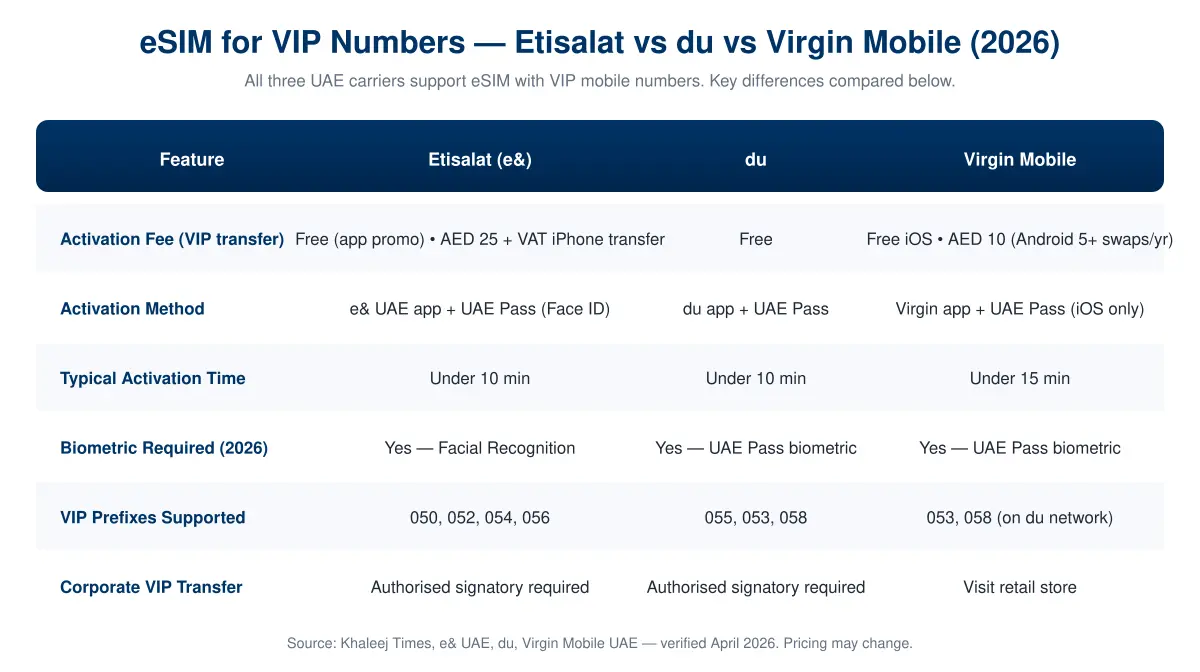
A few practical notes on the table above. Etisalat's "free via app" activation is technically a promotional policy that has been running without interruption since 2024 — it has been renewed each year, but do check the app before assuming it's still in effect. The AED 25 + VAT charge only applies when you're transferring an existing eSIM between iPhones. du's activation is simplest: open the du app, go to "Manage your SIM," tap "Convert to eSIM," and verify via UAE Pass. Virgin Mobile's Android users are the one exception — they have to visit a physical store, while iOS users can self-serve.
If your VIP number is a high-tier Dubai premium number, the carrier doesn't charge extra for the eSIM transfer itself; the value is in the number, not the SIM technology. And if you're shopping for a new number to go directly onto eSIM, every listing on MobileNumber.ae can be activated on eSIM once the transfer-of-ownership paperwork is complete.
Etisalat (e&) eSIM Activation for VIP Numbers
Etisalat's eSIM flow for an existing VIP number runs entirely through the e& UAE app. The prerequisites are straightforward: an active UAE Pass account linked to the Emirates ID the number is registered to, the latest version of the e& UAE app, and the physical SIM inserted in the phone you're activating from. Location services need to be on — e& verifies you are physically in the UAE before proceeding.
Inside the app, open Profile → Your Accounts → Manage → My SIM Cards, then select Replace SIM / Switch to eSIM. The app walks you through a facial recognition check via UAE Pass — this is the 2026 biometric gate and cannot be skipped. Once you pass, you'll receive a QR code on-screen. You can either scan it directly with the same phone (which installs the eSIM profile) or display it on another device for your new phone to scan if you're migrating at the same time.
Two specific notes for VIP owners. First, corporate VIP numbers — numbers registered under a company rather than an individual — require an authorised signatory to log into the business e& portal and approve the eSIM transfer separately. Second, if your VIP number was recently transferred to your name (less than 14 days ago), e&'s system occasionally delays eSIM eligibility until the ownership record fully settles. If the app shows "eSIM not available for this number," wait 48 hours and try again before calling support.
Fees, as of April 2026: free via the app for new eSIM issuance, AED 25 + VAT for transferring an existing eSIM between two iPhones. In-store activation is also AED 25 + VAT.
du eSIM Activation for VIP Numbers
du's eSIM activation is widely considered the simplest of the three. Open the du app, sign in with the VIP number you want to migrate, and tap Manage your SIM → Convert to eSIM. UAE Pass handles the biometric verification — if you've used UAE Pass before for anything else, it's the same facial scan. du pushes the eSIM profile directly to the app, and you confirm installation with one tap. Total time, if your UAE Pass is already set up: under ten minutes.
The same conditions apply as with Etisalat: you must be physically in the UAE, your number must be active with du, and the registered owner must complete the biometric step in person. Corporate VIP numbers on du require authorisation from a company signatory via the du Business portal, the same way Etisalat handles it.
du charges no fee for eSIM activation on any VIP prefix — 052, 055, or 058. If you're moving a particularly expensive number and want reassurance, du's retail stores will complete the activation for you, also free, and you'll walk out with both the biometric activation and a printed record of the transaction. For five- and six-figure VIP numbers, some owners find that worth the short queue.
Virgin Mobile eSIM Activation for VIP Numbers
Virgin Mobile UAE is a digital-first brand operating on du's infrastructure, which makes its eSIM activation particularly fast on iPhone — and particularly inconvenient on Android. iOS users open the Virgin Mobile app, navigate to My Account → My Number → Move to eSIM, pass the UAE Pass biometric verification, enter an SMS OTP, and tap "Install eSIM." The profile installs without leaving the app.
Android users cannot self-activate. Virgin Mobile requires Android customers to visit a physical retail location to complete the swap — a policy Virgin attributes to Android's more fragmented eSIM installation API. If you hold a VIP number on Virgin Mobile and use an Android device, plan a visit to a Virgin kiosk with your Emirates ID and phone.
Fees: free on iOS. Android users who exceed five SIM swaps in a single calendar year incur an AED 29 fee per swap thereafter, though most owners stay well below that threshold. Note that because Virgin runs on du's network, the activation is ultimately routed through du's provisioning system, which means the same biometric and in-UAE rules apply.
Step-by-Step: Transferring Your VIP Number to eSIM
The carrier-specific details above cover the differences. In practice, the path looks the same on all three networks — open the app, choose the convert option, verify biometrically, scan a QR, done. Here is the process visualised:
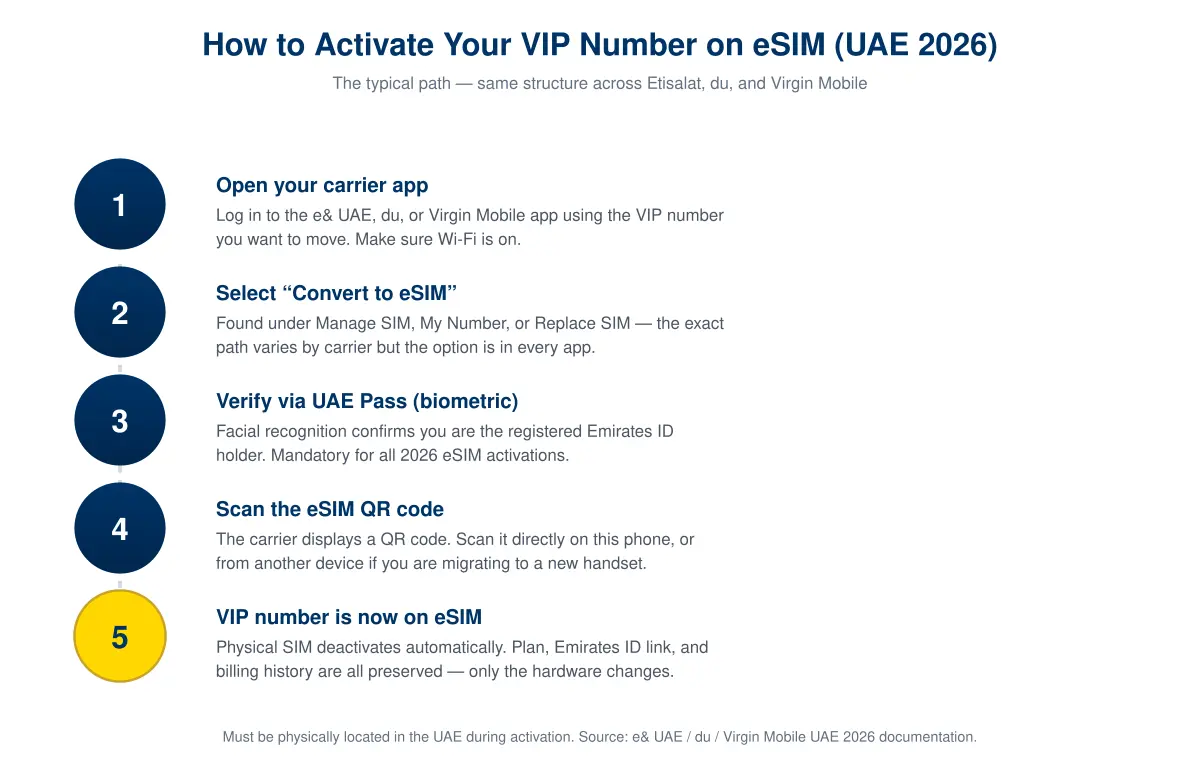
Before you start, three pre-flight checks save most of the problems we see reported. First, confirm the number is registered to you on UAE Pass — if the name on UAE Pass and the name on the carrier account don't match exactly, the biometric verification will fail. Individuals who changed their legal name (common after marriage, or after updating Emirates ID) sometimes have a lag here. Update UAE Pass first.
Second, check your phone's EID (Embedded Identity Document). Dial *#06# — you should see an EID number alongside the IMEI. No EID means no eSIM hardware, and you'll need a different device. Third, make sure you have a working internet connection that is not your VIP number's own mobile data. Use Wi-Fi during the activation, because the moment the eSIM profile installs, the physical SIM deactivates — and if your only internet was that SIM, you lose connectivity mid-transfer.
If all three checks pass, the actual transfer takes under ten minutes end-to-end. Your Emirates ID registration is preserved, your number, plan, and billing history stay put, and calls and SMS resume within seconds on the new eSIM.
Device Compatibility — What Works, What Doesn't
Compatibility is the most common place where transfers get stopped. An eSIM needs two things from the phone: hardware support (the embedded chip) and carrier software support (the right provisioning flow). Virtually every flagship iPhone sold in the UAE since 2018 qualifies. The Android picture is more mixed.
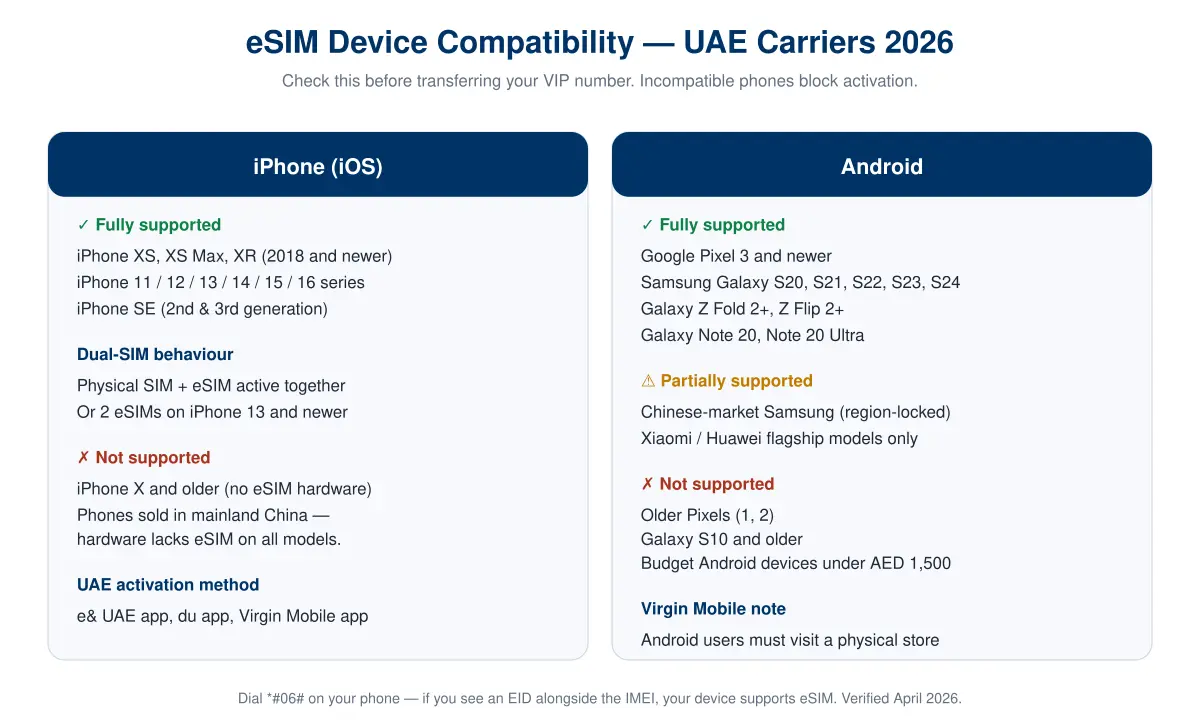
A few traps worth flagging. iPhones purchased in mainland China lack eSIM hardware regardless of model — Apple removes it for that market. If you bought your phone abroad and imported it, check the model number before attempting activation. Similarly, certain region-locked Samsung variants (the "Chinese market" S-series) don't accept eSIM profiles from UAE carriers even though the hardware supports it.
Budget Android devices — the sub-AED 1,500 segment — frequently skip eSIM to save cost. If you've just bought a new phone and plan to move your VIP number onto it, run the *#06# check before you buy, not after. A VIP number can always wait a few days; a phone return-and-exchange after you've started an activation is messy.
Security: Why eSIM Matters After the SMS OTP Ban
In March 2026, the Central Bank of the UAE's Notice 3057 began phasing out SMS OTP as the primary authentication mechanism for UAE bank apps. The consequence: your registered mobile number is no longer the last line of defence for moving money — it is now the device-bound authenticator, tied to a specific handset and to your biometric identity.
eSIM slots into this new model naturally. A physical SIM can be removed from your phone, inserted into another, and, in the wrong hands, used to intercept whatever residual SMS authentication remains. An eSIM cannot be removed in the traditional sense — moving it to a different device requires a fresh carrier-side provisioning, which in 2026 means a fresh UAE Pass biometric check. That's a meaningful extra layer.
For VIP number holders this is doubly important. Your number is not just your communication line; it is the public-facing identity attached to your business cards, LinkedIn, WhatsApp Business, and probably your bank account. Anyone who takes temporary control of that number has a short but dangerous window to impersonate you. eSIM — combined with your biometric-bound UAE Pass — closes most of that window. We cover the broader topic in the UAE SMS OTP ban article.
Common Mistakes VIP Owners Make
Over the last quarter we've tracked the missteps that most commonly delay an eSIM transfer on a VIP number. Five come up repeatedly.
- Activating while abroad. UAE Pass biometric verification requires your device to be physically inside the UAE. Business travellers routinely try to activate from a hotel in Europe, get a cryptic error, and blame the carrier. Return to the UAE or wait.
- Expired Emirates ID. UAE Pass silently falls back to a limited mode when your Emirates ID has expired. eSIM activation is not available in limited mode. Renew the ID first, then activate.
- Wi-Fi disabled during activation. As noted above — when the physical SIM deactivates mid-flow, your only internet disappears with it. Switch to Wi-Fi before starting.
- Failing to remove the old eSIM on the source phone. If you've already got an eSIM and are migrating to a new handset, your carrier will not issue the new profile until the old one is released. Always release first.
- Treating a corporate number as a personal one. If your VIP line is registered to a company, only the company signatory can authorise the eSIM transfer, full stop. Trying to do it from your personal UAE Pass just generates failed attempts.
Frequently Asked Questions
Will my VIP number change if I switch to eSIM?
No. The number stays exactly the same. Your plan, balance, Emirates ID registration, and billing history are preserved. Only the SIM technology changes — the line itself is untouched.
Can I activate an eSIM on a VIP number I just bought on MobileNumber.ae?
Yes, but you need to complete the ownership transfer with the carrier first (Etisalat, du, or Virgin Mobile), so your Emirates ID is the registered owner of the number. Once the transfer is visible in the carrier app, eSIM activation is available exactly as it would be on any long-held number. Our buyer's guide covers the ownership transfer process.
Is eSIM available on all UAE VIP number prefixes?
Yes. Etisalat supports 050, 054 and 056 on eSIM. du supports 052, 055 and 058, including Virgin Mobile numbers. The eSIM capability is tied to the carrier, not to the prefix or tier of the number, so even top-tier premium numbers can run on eSIM.
Can I have two VIP numbers on the same phone with eSIM?
Yes, if your phone supports Dual SIM with two eSIMs — iPhone 13 and newer, and recent Samsung Galaxy S series do. Many VIP owners keep a premium 050 as the personal line and a second premium number for business, both as eSIMs, both switchable in settings.
What happens to my physical SIM after eSIM activation?
It is deactivated on the carrier side within minutes. The plastic card is safe to destroy, though we recommend cutting through the chip before disposal. The number itself is now on your eSIM.
Can I move my VIP eSIM to a new phone later?
Yes, but it's not automatic — you need to repeat the carrier activation flow on the new phone. This is a feature, not a bug: the fresh biometric check on every device change is what makes eSIM more secure than a physical SIM.
Does eSIM work while I'm travelling outside the UAE?
Yes. Once activated, your eSIM roams exactly like a physical SIM would — same international rates, same coverage. The "must be in the UAE" rule only applies during the initial activation, not afterwards.
If I sell my VIP number later, do I have to do anything special with the eSIM?
No. When you complete the ownership transfer to the buyer, the carrier will issue them a fresh eSIM profile tied to their Emirates ID and UAE Pass. Your old eSIM profile is revoked automatically as part of the transfer. The number flows cleanly from your device to theirs.
Conclusion
eSIM is not a gadgety extra in the UAE in 2026 — it is the default path the carriers, the TDRA, and the Central Bank are all quietly steering towards. For anyone holding a premium mobile number, the calculus is straightforward: eSIM preserves the number, reduces your attack surface after the SMS OTP phase-out, and costs nothing or close to it on all three networks.
- Start in the app, not the store. Etisalat, du, and Virgin Mobile all run the flow from their respective apps. Unless you're on Android with Virgin Mobile, you never need to queue.
- Biometric is non-negotiable in 2026. Update UAE Pass and make sure your Emirates ID is current before you start — half of failed activations trace to a mismatched name or expired ID.
- Check device compatibility before the transfer. Dial *#06# and look for the EID. No EID, no eSIM — swap to a compatible phone first.
- Treat it as a security upgrade. The physical SIM was the weakest link in UAE mobile identity. An eSIM bound to your UAE Pass biometric closes most of the cloning and SIM-swap vectors that targeted VIP owners in prior years.
- Keep the number, not the plastic. Your VIP number is the asset. The SIM technology underneath it is just implementation detail — and eSIM is now the better implementation.
If you're shopping for a premium number to activate directly on eSIM, browse current listings across all UAE carriers and prefixes on MobileNumber.ae. If you already own a VIP number and want to list it for sale before or after moving to eSIM, the listing process takes under five minutes.